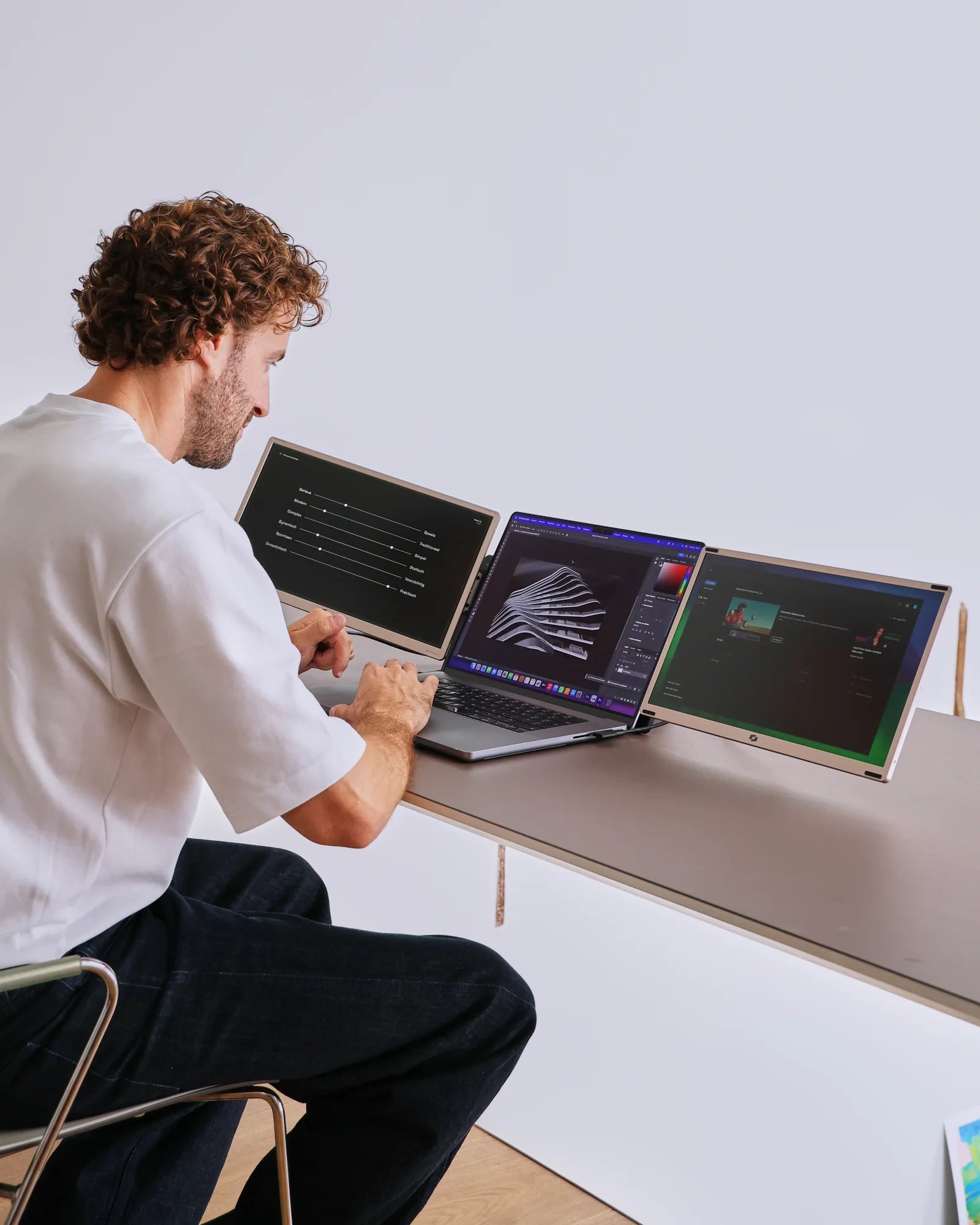
Portable monitor · 2 additional screens

Screenmate Infinity 15.6″

Two extra screens that adapt to your work. Detach them, rotate them, and choose your own setup. It is also possible to use a single screen separately.

4,9/5455 reviews

Free shipping · 50-day return policy

  • Choose your own setup. Detach the screens and combine them the way you work.
  • One or two screens. Also use one screen separately when that is sufficient.
  • Space for your work. Two 15.6-inch IPS screens with Full HD resolution.
  • Get started without a driver. Connect the screens to your laptop using the included cables. To use both simultaneously, your laptop must support two external screens.

How do I connect my Screenmate®?

Select the connection method that your laptop supports from the options below.

  • 2 × USB-C

    2 cables

    Connect each monitor using its own USB-C cable. Both ports on your laptop must support video output and provide sufficient power. Your laptop must be able to drive two external monitors at the same time.

  • USB-C + HDMI + USB-A

    3 cables

    Use USB-C with video for one monitor. Connect the other via HDMI for video and USB-A for power. Your laptop must support both video paths at the same time.

The necessary connection cables and user manual are included.

Are you unsure about your connection?

Having two USB-C ports doesn't automatically mean you can use two external displays. Check your laptop's video support and the limit on the number of displays that can be used simultaneously. For MacBooks, this varies depending on the chip, model, and whether the laptop is open or closed. If you're unsure, please send us your exact laptop model.

Ask us to take a look
In stockCheck the current delivery time in your shopping cart
  • 50 dayscooling-off period
  • 2 yearswarranty
  • Customer ServiceAvailable 7 days a week
Customer Reviews4.9 /5Uit 455 Infinity-reviewsView all reviewsSelected, genuine customer reviews
Here's how it works in practice

Give your programs a fixed place on the Infinity. Keep your work and your sources side by side, so you have to switch between windows less often and see what you need faster.

Professional works creatively with the flexible Screenmate Infinity setup.

Designed for flexible work

One system. Different workplaces.

Adjust your setup to the task, rather than the other way around. Work with one or two screens, rotate a screen for a longer document, or share your view with someone at the table. Then, pack the system away together.

  • Two screens that can be used independently
  • Different viewing angles and configurations
  • Full HD IPS with 300 cd/m²
  • No additional driver required

Designed for Your Workday

Your work is changing. Your screens are moving with it.

Two 15.6-inch Full HD screens give you extra space. The modular design lets you use the screens separately or combine them in other ways. Handy when you switch between documents, presentations, and collaboration.

2 extra screens 15.6″ per screen 2390 g weight
Screenmate Infinity — working with extra screen space, image 1
3D Product View

The Infinity in detail

Everything you want to know, clearly laid out.

The most important features for your workspace and connectivity.
Screen
2 × 15.6″ IPS LCD · 16:9
Resolution
1920 × 1080 Full HD per screen
Color & Brightness
72% NTSC · 300 cd/m²
Refresh & Response
60 Hz · 10 ms
Connect
2 × USB-C or USB-C + HDMI + USB-A
Collapsed
36.1 × 21.6 × 4.5 cm
Weight
2390 grams
Software
No additional driver required
01

Connect

Select the connection method supported by your laptop. Use the included cables for video and power. Make sure your laptop can handle two external displays at the same time.

02

Choose Your Formation

Place the screens together or use them separately. Choose the viewing angle and working height that suit your task.

03

Continuing to Work

In the display settings, select "Extend." Display your source, reference material, or schedule on an additional screen and continue working on your laptop.

Screenmate Infinity — work flexibly and take it with you, image 1

Screenmate Infinity 15.6″

A better overview for your next workday.

Choose your version and give your work room to breathe. 4.9/5 · reviews
for €399 in stock · free shipping

Customer reviews of the Screenmate Infinity

Other users' experiences.

Customer Reviews

Overall rating: 4.9 / 5 from 455 reviews.

Top product. Echt een mooi vormgegeven scherm. Maakt een robuuste indruk zeker.

Infinity

Super blij hiermee. Eenvoudig aan te sluiten echt.

Infinity

Voelt prettig stevig aan. Fraai vormgegeven. Zou m zo aanraden trouwens.

Infinity

Blij mee. De voet houdt alles keurig stabiel trouwens.

Infinity

Prima beeld, fraaie kleuren. Kinderlijk eenvoudig om aan te sluiten trouwens.

Infinity

Prima scherm, robuust gebouwd. Zo aangesloten, echt eenvoudig. Bevalt beter dan ik had gedacht echt.

Infinity

Kleuren kloppen fraai. Aansluiten is echt simpel echt.

Infinity

Een echt fraai scherm om te zien. Ziet er echt fraai uit. Ik gebruik m dagelijks onderweg.

Infinity

De kwaliteit voel je meteen trouwens.

Infinity

Mooi design. Fraaie kwaliteit, degelijk gemaakt trouwens.

Infinity

Goede aankoop. Het scherm is lekker helder hoor.

Infinity

Tevreden mee. Voelt lekker robuust aan zeker.

Infinity

Kleuren kloppen mooi. Voelt lekker stevig aan echt.

Infinity

Tot nu toe wat een fijne beeldkwaliteit. Zou m zo weer kopen.

Infinity

Voor mij het beeld is van prima kwaliteit. Goede afwerking en kwaliteit hoor.

Infinity

Helemaal top. Met de duidelijke handleiding zo op weg. Goed beeld, fraaie kleuren hoor.

Infinity

Een mooi en robuust scherm. Werkt prima als losstaand scherm echt.

Infinity

Helemaal prima. Stevig scherm dat er strak uitziet zeker.

Infinity

Persoonlijk robuust en fraai afgewerkt scherm.

Infinity

Het scherm is fijn helder. Gewoon een mooi vormgegeven scherm. Ik gebruik m vooral voor thuiswerken.

Infinity

Na een paar weken meteen beeld, niks instellen. Top klantenservice, snel antwoord. Voorlopig erg content.

Infinity

Content mee. Kleuren kloppen fraai. Vijf sterren waard.

Infinity

Mooi strak design. Gewoon blij mee echt.

Infinity

Goed scherm, solide gebouwd. Prettige, duidelijke handleiding. Geen drivers nodig, gewoon inpluggen zeker.

Infinity

Echt een aanrader. Prima beeldkwaliteit. Duidelijke handleiding erbij. De vele standen maken m flexibel hoor.

Infinity

Echt een aanrader. Maakt een robuuste indruk trouwens.

Infinity

Helemaal top. Praktisch dat er zoveel standen mogelijk zijn echt.

Infinity

Fijn robuust scherm met mooi beeld. Staand werken aan teksten is heerlijk trouwens.

Infinity

Helemaal top. Ziet er zeker mooi uit trouwens.

Infinity

Een gewoon fraai scherm om te zien. Duidelijke handleiding erbij. Lekker dat ie ook in portretmodus kan zeker.

Infinity

Na een paar weken een kabeltje en het beeld staat er. Fijne kwaliteit, voelt degelijk hoor.

Infinity

Mooie beeldkwaliteit voor zo'n schermpje hoor.

Infinity

Fraai design. Kleuren kloppen fraai zeker.

Infinity

Tot nu toe degelijk gebouwd, niks wankels aan.

Infinity

Sinds kort helemaal top. Fijn stevig scherm met mooi beeld hoor.

Infinity

Voor mij een gewoon mooi scherm om te zien. Beeldkwaliteit zit dik in orde hoor.

Infinity

Echt blij hiermee. Lekker stevig scherm met mooi beeld. Aansluiten ging super makkelijk. Ziet er echt fraai uit zeker.

Infinity

Echt tevreden gebruiker. Robuust en fraai afgewerkt scherm. Veel verschillende standen, voor elk wat wils hoor.

Infinity

Persoonlijk de standaard staat heel stabiel. Het ontwerp is zeker netjes. Prettige, duidelijke handleiding. Vooral voor thuiswerken gebruik ik m.

Infinity

Eerlijk, de voet houdt alles keurig stabiel. De support van Screenmate is gewoon fijn.

Infinity

Questions Before Purchasing

Be sure to order the right monitor.

Not sure about your connection, laptop model, or preferred setup? Screenmate's Dutch support team will work with you to find the right solution before you place your order.

Discuss your situation with Screenmate →
What ports does my laptop need?+

2 × USB-C, or USB-C + HDMI + USB-A. Having two USB-C ports doesn't automatically mean you can use two external displays. Check your laptop's video support and the limit on the number of displays that can be used simultaneously. For MacBooks, this varies depending on the chip, model, and whether the laptop is open or closed. If you're unsure, please send us your exact laptop model.

Do I need a driver?+

No additional driver is required. Your laptop must support the required number of external displays and the selected connection method.

Can I use it with a MacBook?+

Only if your specific MacBook supports two external displays via the selected ports. The limit varies by chip and model; for some models, it also differs between open and closed use. A USB-C hub does not automatically add support for a second external display. Please send us your model information for advice.

What's in the box?+

You will receive the Screenmate Infinity 15.6″, the necessary connection cables, and the manual. Use the original cables and follow the connection instructions.

Can I return the monitor?+

You have a 50-day cooling-off period to assess whether the Screenmate Infinity suits your workspace. You can find the current terms and conditions in Screenmate's return policy.

Screenmate Infinityfor €399 · in stock