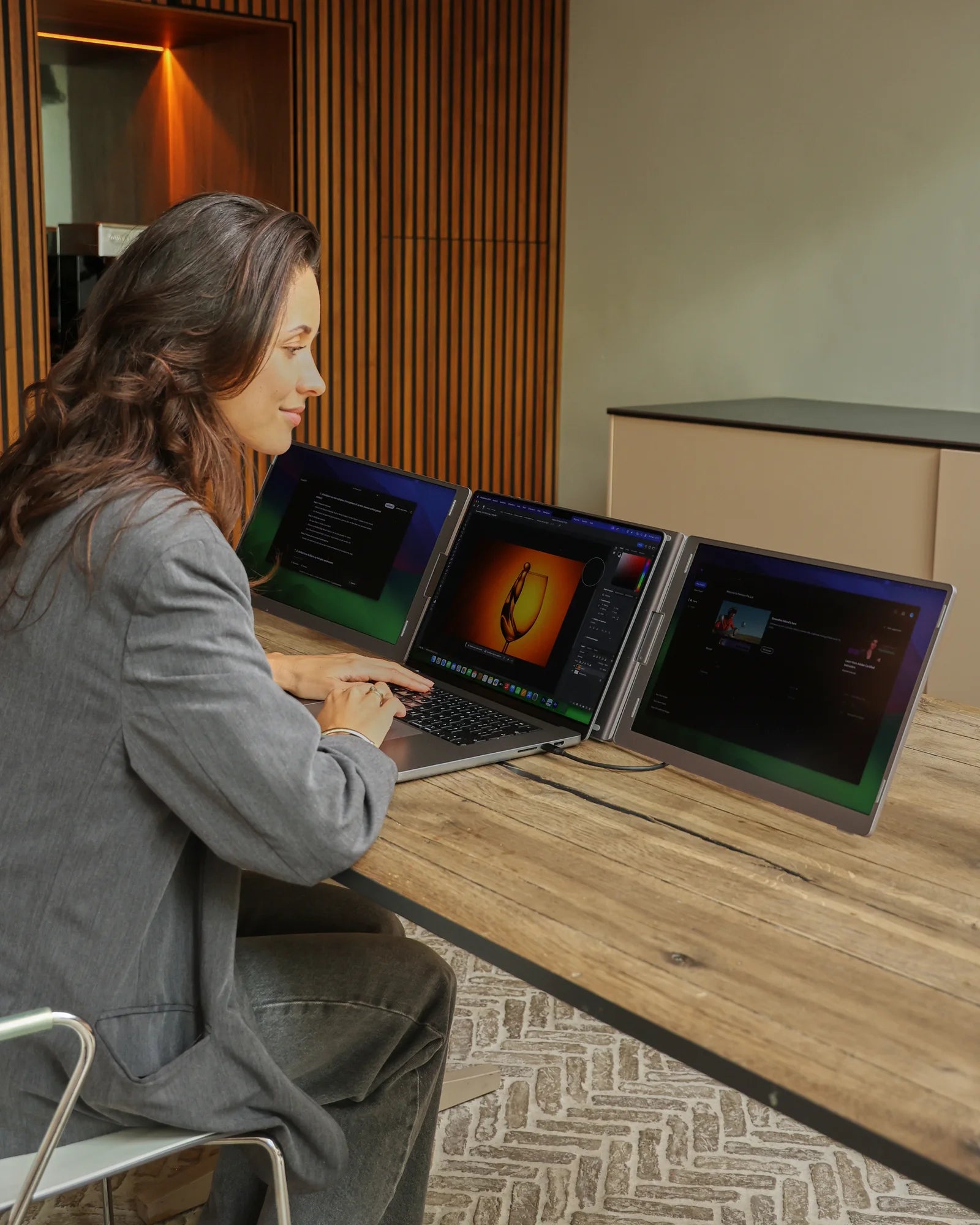
Portable monitor · 2 additional screens

Screenmate OneCable 14″

Two extra screens, one cable to your laptop. Install the included driver and give your documents, meetings, and schedules their own dedicated space.

Driver installation required · the necessary software is included.

4,8/5240 reviews

Free shipping · 50-day return policy

  • Two additional screens. Work on your document while viewing your sources and collaboration notes side by side.
  • More vertical screen space. 16:10, 1920 × 1200, and 100% sRGB on both screens.
  • A single USB-C cable. The included driver controls both screens.
  • For Windows and MacBook. Works with supported Windows laptops and MacBooks, including models with M1, M2, and M3 chips, using the included driver.

How do I connect my Screenmate®?

One-time driver installation required. Select your connection method below.

  • USB-C

    1 cable

    First, install the included driver. Then connect the OneCable to your laptop using the included USB-C cable. Follow the manual for information on the required USB-C port and power supply.

  • 2 × USB-A

    2 cables

    First, install the included driver. Then connect both of the included USB-A cables as indicated in the manual, so that data and power are available.

The necessary connection cables and user manual are included.

Are you unsure about your connection?

You'll need a supported operating system, the included driver, and the correct connectors. OneCable and Panorama are not supported on Linux. Are you using Windows on ARM, a managed work laptop, or are you unsure about your MacBook? Please send us your exact model and operating system before purchasing.

Ask us to take a look

Temporarily out of stock?

Please enter your email address. Our support team will contact you as soon as this screen is available again.

This is a non-binding registration, not an order. You don't have to pay anything yet.
Sold Out
  • 50 dayscooling-off period
  • 2 yearswarranty
  • Customer ServiceAvailable 7 days a week
Customer Reviews4.8/5Uit 240 OneCable 14"-reviewsView all reviewsSelected, genuine customer reviews
Here's how it works in practice

Assign a fixed location for your programs on the OneCable. Keep your work and your resources side by side so you don't have to switch between windows as often and can find what you need more quickly.

Screenmate OneCable — Setup and Product Details, Image 1

Designed for flexible work

Unfold. Connect. Get back to work.

The OneCable stands on its own stand. Fold the screens back up when you're done working and take your entire setup with you. One system for the workspaces you love.

  • Two 14-inch IPS displays
  • Foldable setup with its own support structure
  • Included connection cables
  • One-time driver installation

Designed for Your Workday

Better organization.Fewer cables.

The two 14-inch screens provide extra workspace without requiring a large, permanent setup. The 16:10 aspect ratio gives you more vertical space for documents and spreadsheets. When folded up, you can take the OneCable with you to your next workspace.

2 additionalscreens14″ perscreen1552 g weight
Screenmate OneCable — Working with Extra Screen Space, Image 1
3D Product View

The OneCable in Detail

Everything you want to know, clearly laid out.

The most important features for your workspace and connectivity.
Screen
2 × 14-inch IPS LCD · 16:10
Resolution
1920 × 1200 per screen
Color & Brightness
100% sRGB · 350 cd/m²
Refresh & Response
60 Hz · 15 ms
Connect
USB-C or 2 × USB-A
Collapsed
34.5 × 22 × 2.5 cm
Weight
1,552 grams
Software
Requires the included driver
01

Installation and Connection

Install the included driver before using the monitors. Then choose the connection method for your laptop and connect the cables according to the manual.

02

Choose Your Formation

Set up the stand so it's stable, and choose a comfortable viewing angle. Position your laptop so that all the screens remain within reach.

03

Continuing to Work

In the display settings, select "Extend." Display your source, reference material, or schedule on an additional screen and continue working on your laptop.

Screenmate OneCable — flexible use and portability, image 1

Screenmate OneCable 14″

A better overview for your next workday.

Choose your version and get started with the included driver.4.8/5 · reviews
for €349 Keep me postedSold Out · Free Shipping

Customer Reviews of the Screenmate OneCable

Other users' experiences.

Customer Reviews

Overall rating: 4.8 / 5 from 240 reviews.

De standaard is prettig robuust. Kwaliteit zit dik in orde. Beeldkwaliteit zit dik in orde zeker.

OneCable 14"

Zeker een aanrader. Prettige stevige voet eronder. Prettig helder, ook naast het raam. Fijne support, kreeg snel reactie hoor.

OneCable 14"

Meer dan tevreden. Fraai helder beeld, ook bij daglicht. Een mooi en solide scherm. Het design oogt premium. Bestelling was snel bezorgd zeker.

OneCable 14"

Sinds kort super tevreden! Fijn dat beeld en stroom via 1 kabel lopen. Lekker licht om mee te nemen. Vijf sterren waard.

OneCable 14"

Meteen verbonden, geen gedoe. Ik gebruik m dagelijks voor mijn werk.

OneCable 14"

Inmiddels praktische beschermhoes erbij. Kleuren kloppen mooi. Ik gebruik m vooral op de bank.

OneCable 14"

Fijne robuuste voet eronder. Praktische beschermhoes erbij. Oogt duur door het strakke ontwerp.

OneCable 14"

Mooie beeldkwaliteit voor zo'n schermpje. Ik gebruik m vooral voor thuiswerken.

OneCable 14"

Ik ben verkocht. Handige beschermhoes erbij. Een mooi en robuust scherm echt.

OneCable 14"

Voor mij heel tevreden! Lekker robuust scherm met mooi beeld. Zo aangesloten, super eenvoudig.

OneCable 14"

Tot nu toe beeldkwaliteit zit dik in orde. Gebruik m vooral voor videobellen. Duidelijke handleiding erbij. Heel handig in gebruik.

OneCable 14"

I highly recommend it. The screen has a nice finish—it doesn't look cheap at all. It has a sleek and modern design.

OneCable 14"

It's great that the cover comes standard. It definitely looks nice. I mainly use it in my home office. Support really helped me out quickly.

OneCable 14"

It's great that the video and power signals run through a single cable. Great screen, solidly built. Thanks, Screenmate. Great customer service—they helped me out quickly.

OneCable 14"

The picture quality is actually pretty good for such a small screen. Screenmate's support is really great.

OneCable 14"

Just a beautifully designed screen. The included protective case is very practical. I'm very satisfied.

OneCable 14"

The brightness is great for outdoor use. Good screen, solidly built. Thanks, Screenmate.

OneCable 14"

So far, it's a good, sturdy screen. It has a nice, sturdy base. It's pretty easy to use.

OneCable 14"

Nice, sturdy base. The picture is nice and clear, even next to the window. They provided great support when I had a question. The picture quality is definitely good.

OneCable 14"

Absolutely great. Setting it up was a breeze. The picture quality is really good. I use it every day when visiting clients on-site.

OneCable 14"

The screen feels high-end. Connecting it is really easy, by the way.

OneCable 14"

What a sight. Just one cable—so nice and neat.

OneCable 14"

Nice, bright, and clear screen. Great support—I got a quick response.

OneCable 14"

A nice, sturdy screen with a great picture. I'm just happy with it.

OneCable 14"

It's great that the case comes included as standard. I'm very happy with it so far. Great support, they helped me out nicely.

OneCable 14"

I'm sold. The image looks vibrant and natural.

OneCable 14"

Very satisfied. The built-in stand is just solid. You only need one cable, which is super convenient. I use it mainly for my studies.

OneCable 14"

Bright, clear screen, even in sunlight. The sleeve fits the screen perfectly. I always bring it along on the weekends, just in case.

OneCable 14"

A screen that looks high-quality. Great build quality—nothing cheap about it. I use it every day on the weekends as a secondary screen.

OneCable 14"

Beautiful, sleek design. What a crisp image. I mainly use it for work. Thanks, Screenmate.

OneCable 14"

The design is really neat.

OneCable 14"

Exactly what I was looking for. Just one little cable and I’m ready to go. One cable and the image is there. A nice, sturdy screen. With the case, I can safely take it with me anywhere. Good quality; it feels solid.

OneCable 14"

Very satisfied. The stand is rock-solid. Beautiful design. Handy sleeve—saves me from having to buy one separately. Great quality for the price. Plugs right in—no hassle.

OneCable 14"

The design is impressive. The case feels well-made. I mainly use it in a hotel room. Nothing but praise.

OneCable 14"

I'm happy with it. The screen is sturdy and beautifully finished. The included protective case is very handy. I use it every day when I'm on the go. The order was delivered quickly.

OneCable 14"

What a beauty. The screen is crisp, bright, and clear. Setting it up is definitely easy. The stand is nice and sturdy. I use it everywhere.

OneCable 14"

It's incredibly easy to set up. The built-in stand is definitely sturdy. You only need one cable, which is super convenient. Support helped me out right away. I always bring it with me on long workdays.

OneCable 14"

A good, sturdy screen. The case protects it well from scratches. I always bring it with me to the office. No power outlet needed—just my laptop.

OneCable 14"

Absolutely great. The picture quality is excellent.

OneCable 14"

Plugged in in under a minute. Bright enough to use outdoors.

OneCable 14"

Questions Before Purchasing

Be sure to order the right monitor.

Not sure about your connection, laptop model, or preferred setup? Screenmate's Dutch support team will work with you to find the right solution before you place your order.

Discuss your situation with Screenmate →
What ports does my laptop need?+

USB-C or 2 × USB-A. You'll need a supported operating system, the included driver, and the correct connectors. OneCable and Panorama are not supported on Linux. Are you using Windows on ARM, a managed work laptop, or are you unsure about your Windows laptop or MacBook? Please send us your exact model and operating system before purchasing.

Do I need a driver?+

Install the included driver before using the monitors. Check in advance to make sure your operating system is supported and that you are allowed to install software on your laptop.

Does the OneCable work with Windows and MacBook?+

Yes, on supported Windows laptops and MacBooks—including models with M1, M2, and M3 chips—using the included driver. Check to see if your version of Windows or macOS is supported and if you’re allowed to install the software. On a managed work laptop, you may need permission from your IT department.

What's in the box?+

You will receive the Screenmate OneCable 14″, the necessary connection cables, and the user manual. Use the original cables and follow the connection instructions.

Can I return the monitor?+

You have 50 days to decide whether the Screenmate OneCable is a good fit for your workspace. You can find the current terms and conditions in Screenmate's return policy.

Screenmate OneCablefor €349 · Sold out
Keep me posted